Mazda DCA-8000 Knowledge Base
  1. Home
  2. Getting Started
  3. Main Menu
Searching...

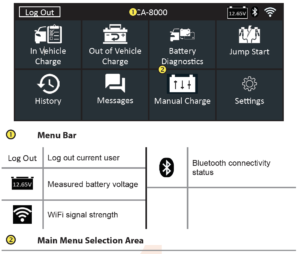
Main Menu

Additional Screens

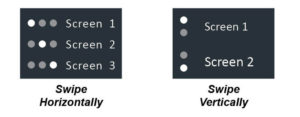
The dots at the bottom or side of a menu or results screen indicate additional screens are available. Use your finger to swipe horizontally left, right, up or down across the Controller screen to vie all of the results.
Main Menu Icons

Updated on September 15, 2020

Related Articles

  • Test Results Decision Tables
  • Safety Precautions
  • Initial Setup
  • Connections
  • Charging Unit Front / Back
Copyright © 2017 Midtronics, Inc. All rights reserved. Midtronics and the Midtronics logo are registered trademarks of Midtronics, Inc. All other marks are the property of their respective owners. www.midtronics.com